Wednesday, July 24, 2013

Configuring recycle bin for SharePoint

Configuring recycle bin for SharePoint

The recycle bin can also be accessed as a site administrator at the site collection level.

This feature is configured at the Web application level.

This capability can be used by the users to recover lists, documents and document libraries, folders and list items.   By default 1st stage recycle bin is 30 days with subsequent 2nd stage at 30 days as well and/or 50% of site quota limit. You can adjust the 1st and 2nd stage quota can at the web application level.


SharePoint Topics


SharePoint Topics

SharePoint foundation
•       Service applications, Web applications, Sites, Webs, Lists, list definitions, list instances, content types, site columns, master pages, page layouts, site pages, application pages, themes, branding, ribbon customization
•       Webparts and controls
•       OOB webparts  like content query webparts, content editor webparts, page viewer webparts, search webparts, chart webparts, XSLTListview webparts, dataview webparts, listform webparts etc
•       Custom webparts, visual webparts, asynchronous webparts, conncted webparts, editor parts and tool parts, personalizable webparts
•       Web user controls, custom controls, delegate controls
•       Workflows – Designer level workflows, Sequential workflows, state machine workflows, reusable workflows,  Site workflows, etc
•       Event receivers (List, Item, Web, Email, Workflow, feature)
•       Sandboxed solutions, farm solutions, and full trust proxies
•       Timer jobs
•       Manual packaging of wsp files – .ddf, manifest.xml, feature.xml, element.xml files etc.
•       Powershell scripts
•       Client object model – ECMA, Managed client object model
•       Server object model, WCF Data services, RESTful services,  LINQ to SharePoint
•       CAS policies
•       Site templates and site definitions, feature stapling, save as templates, web templates,
•       Diagnostic logging(ULS log files), code review , fxcop, spdispose checker, power tools, code metric tools.
Advanced SharePoint
InfoPath
•       Working on domain level and administrator approved form templates
•       InfoPath forms with code behind
•       Data-connections library-.udcx files                

Localization and Internationalization
•       Configuration of MUI(multi-user interface)
•       Configuration Variations for publishing sites   

•       IRM policies – Custom expiration formulas, auditing, expiration etc.

Search services- SharePoint 2010
•       Installation, configuration of Fast Search 2010
•       Configuration of content sources, crawl  rules, scopes, scope rules, metadata properties,
•       Content and Query search service application
•       Customization of search center
•       Customization of visual best bets, faceted search, search core results webparts,  Keyword query, FullTextSqlQuery, Search web services
•       Crawling external sources
•       Custom Protocol handlers, IFilters, Search Connectors

Business connectivity services
•       Configuring BCS, profile pages, creating external content types, external lists in SharePoint designer, BCS web parts like Business Data Actions, Business Data Item, Business Data List, Chart Web Part, Excel Web Access, Visio Web Access
•       Implementation custom .net assembly connector to connect to LOB and implemented BCS methods like finder, specific finder, creator, updator, deletor, filters
•       BCS Meta man

Secure store service application
•       Configuration of secure store service application, creating application ids for storing service account credentials in scenarios like consuming web services(WCF Data services, Oracle web services, connecting to BCS LOBs, PPS etc).
•       Retrieving secure store credentials from the credential store in various custom solutions.  

Authentication mechanisms
•       Classic authentication
•       Windows vs NTLM
•       Claims authentication
•       Windows
•       Sql membership provider, LDAP membership provider.
•       Configuring FBA
•       Web parts for login, user registration, forgot password, retrieve password.
•       Trusted identity provider (ADFS-AD, ADFS-Other identity provider like OpenSSO).
•       Installation of certificates on IP-STS, RP-STS
•       Establishing trust relationships
•       Implementation of custom claims provider, people picker
•       Implementation of claims augmentation                    
Visio services
•       Configuration of Visio services and Visio web access webpart
•       Visio Services JavaScript API   

User profile service application and MySItes
•       Configuration of user profile service application, user profile properties and their mapping, profile synchronization and profile import
•       Consuming OOB user  profile web services
•       User profile object model for retrieving user profiles and properties.

Integration of SSRS with SharePoint
•       SQL Server Reporting Services Report Viewer webpart
•       Installation and Configuration of SSRS
•       Tabular and matrix reports

Managed Metadata services
•       Term store, taxonomies, folksonomies
•       Content type syndication hub
ECM, Documents and Records management features
•       Record Hold, routing
•       Document ID service, document sets
•       Content organizer rules, drop off library
•       IRM policies
Performance Point services
•       Dashboard designer
•       SSAS, SSRS, Third-party Data source integration
•       KPIs, Reports, Drill-downs
•       Data connections library– secure store,

Secure-Store service application
•       Generating keys
•       Adding application ids
Publishing and subscribing service applications in cross farm scenarios
Word automation services
Excel Services
•       Excel workbooks
•       Excel web- access webpart
•       Custom UDF functions
•       Trusted locations
•       Data connections - .odcx
Office Web Apps integration
•       Installation, configuration
•       Powerpoint services
SharePoint capacity planning and Governance
SharePoint OOB (Out of the box) features
UI operations, OOB Web services
Customization in SharePoint designer
Pages, Content Types, lists, workflows, external content types, html, javascript, css, jquery, xslt, webparts, master pages, page layouts
Third party products integration
•       SAP Integration with SharePoint
•       Oracle Integration with SharePoint etc
SharePoint administration
SharePoint installation, configuration, post-installation steps, health monitoring, SSOM, SCOM, Logs, Backup and restore, Hardening the server, Import and export, Active directory, DNS, Alternate access mappings, service accounts
SharePoint farm topologies- WFE, APP server, Database, Index, Query, SharePoint administration toolkit- Diagnostics, replication, powershell scripts
Migration projects
Upgrade of MOSS 2007 to SharePoint 2010

Upgrade of WSS 2.0 to WSS 3.0
Migration of third party ECM products to SharePoint
Exposure to other ECM products
Exposure on Alfresco, Liferay, Adobe CQ, Vignette, Stellent, Drupal, Joomla, DotnetNuke, Site Core, Interwoven, FileNet, etc.
Understanding of content management concepts

Other SharePoint Capabilities

Third party SharePoint products
AvePoint products, Nintex workflow solutions, K2, BCS Meta Man, CAML Builder

Increasing the file upload maximum size

Increasing the file upload maximum size

I was not able upload a document of size more than 50 MB. It was giving document upload with status as failed.

This is because of the default configuration of 50MB for the corresponding web application in the SharePoint central administration website.

To increase the default file upload maximum size, follow the below steps.

1) Goto -> Central Administration
2) click on “Manage Web Applications”
3) Select (single click on the row) desired web application
4) Click on “General Settings” in the ribbon
5) Under "Maximum Upload Size", change the setting to the desired value (e.g. 100 MB in our example)
6) “OK”

If you are running IIS 7, follow the below KB article
http://support.microsoft.com/kb/944981/en-us


Service Unavailable

While browsing the SharePoint web application, I got the below error.

Service Unavailable

The possible reasons why this error occurs are 

1) Your application pool for the corresponding SharePoint web application is down  (is not in running state)
2) You might have changed your application pool identity password.

Cannot connect to configuration database

While opening the SharePoint web application I received the below error.

Cannot connect to configuration database

The possible reasons for this error are 
1) You might have changed the application pool identity password.
2) The SQL server instance fro SharePoint is not in "running" state.
3) There is some network issue connecting to the SQL server database.

Error parsing XML, line 666, column 112 The entity name must immediately follow the '&' in the entity reference.

Error parsing XML, line 666, column 112 The entity name must immediately follow the '&' in the entity reference.

While editing the blogger template html, I faced the below error.

Error parsing XML, line , column  The entity name must immediately follow the '&' in the entity reference.

This occurs because you have character "&" in the html code. which you need to replace it with "&"
This has solved my issue and I was able to save the html

Tuesday, July 23, 2013

Coding Standards, Guidelines, and Best Practices

 Coding Standards, Guidelines, and Best Practices


Coding standards by msdn


Quick Links:
Naming Conventions

Class Design Guidelines        

Best Practices   

Tools

FXCop:
This is an application which analyzes managed code assemblies and reports information about the assemblies, such as possible design, localization, performance, and security improvements.

Code metrics tools by visual studio gallery:
Cyclometic complexity, class depth

SPDisposeChecker: 
Analyzes memory leaks in your managed code and reports the same

SharePoint Code Analysis Framework (SPCAF) BETA

Web site worker process has been terminated by IIS error

 Web site worker process has been terminated by IIS error

You receive the below error
" Web site worker process has been terminated by IIS with error message" while you are debugging the solutions


This is because of the default timeout setting which is 90 seconds for the corresponding worker process (w3sp.exe).

In order to debug for more time without any error message follow the below steps.

  1. Go to IIS Manager (Run-> inetmgr)
  2. Expand the leftside tree view and click on the Application Pools
  3. Select the corresponding application pool for the worker process you have attached in the visual studio while debugging
  4. Click on the “Advanced Settings” in the right side of the pane.
  5. Locate the Process Model section in the advanced settings dialog box
  6. Set Ping Enabled to False.
  7. Set Ping Maximum Response Time to a value that is larger than 90 seconds say 300 seconds.
  8. Setting the “Ping Enabled” to False stops the IIS from checking whether the worker process is still running and keeps the worker process alive until you have stopped debugging the process.
  9. Click OK 

Debugging SharePoint Web application in Visual Studio

1)      Debugging farm solutions (applies to MOSS 2007 / SharePoint 2010)

a.       Using user-interface
                                                               i.      Go to Internet Information Services 7.0 (Run->inetmgr)
                                                             ii.      Single click machine name in the left side of the tree view
InetMgr


                                                            iii.      Double click “Worker Processes” in the IIS Section in Features view as shown below.
Worker processes

                                                           iv.      Identify the ProcessID corresponding to your web application application pool
                                                             v.      Attach the process with the process id identified in the above step in the visual studio
b.      Using command line
                                                               i.      Open Run->Cmd
                                                             ii.      Type Appcmd –list wp
1.       This command will list the worker processes present running in the current machine
2.       Identify the ProcessID corresponding to your web application application pool
3.       Attach the process with the process id identified in the above step in the visual studio

2)      Debugging Sandboxed solutions

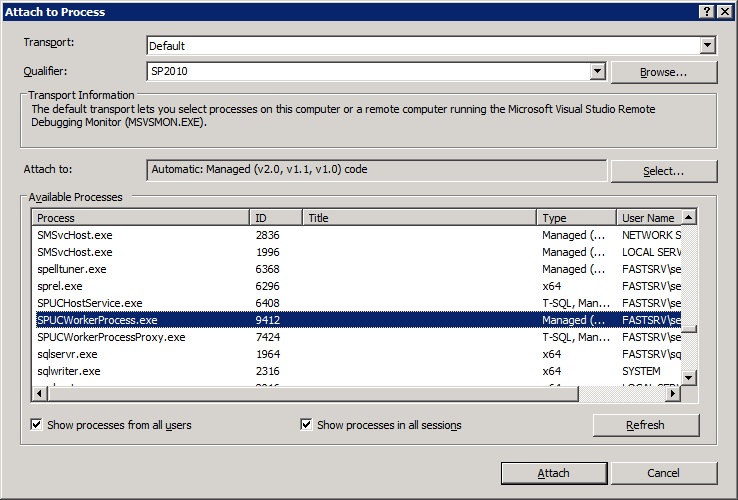
a.       Pre-requisite :  The SharePoint Sanboxed User code service is started. You will see that the three process “SPUCHostService.exe”, “SPUSWorkerProcess.exe” and “SPUCWorkerProcessProxy.exe” are running
b.      Attach the “SPUSWorkerProcess.exe” process in the visual studio as shown below

3)      Debugging Full trust proxies or hybrid solutions.

a.       You have to attach two processess
                                                               i.      one is the worker process corresponding to your web application (W3WP.exe)
                                                             ii.      And the other is the corresponding “SPUCWorkerProcessProxy.exe” process as shown below


4)      Debugging Timer Jobs

a.       You have to attach two processess
                                                               i.      one is the worker process corresponding to your web application (W3WP.exe)
                                                             ii.      And the other is the corresponding “OWSTimer.exe” process as shown below


Oracle11g Database Instance Creation

Oracle11g Database Instance Creation

1)      Click on Start and Oracle Database Assistant as shown below.


2)      Click on next

3)      Select “Create database” and click on next.

4)      Select Custom database

5)      Fill in the details and click on next 


6)      Click next

7)      Click next


8)      Click browse and select the location and click on next.


9)      Click next

10)   Click next

11)   Click next

12)   Click next

13)   Click next

14)   Click next

15)   Click next


16)   Click Finish and wait till the database is created.